For protein engineering teams
Machine learning for protein engineering with your own assay data
Updated October 2026
Machine learning for protein engineering in TeselaGen means Discover, the AI/ML toolkit that learns from your sequences and assay measurements and recommends the next variants to build. Synthetic Evolution® is TeselaGen's name for the engine behind it, and every run sits in the same workspace as your designs, notebook and assay results.
What does TeselaGen Community include for protein engineering?
TeselaGen Community, the free edition for individual researchers, academic labs and small teams, holds the designs and assay results a machine learning round trains on. It includes:
- The electronic lab notebook, with tables and spreadsheets for assay results next to each experiment
- Sequence editor and libraries for DNA and amino acid sequences, with reverse translation from protein to DNA
- DNA assembly design with an assembly protocol for each design
- Integrations and the REST API, to move data in and out
- TeselaGen CoScientist, the AI assistant inside the platform
Why run machine learning for protein engineering next to your designs?
Because every round moves data between design, the bench and the model, and TeselaGen keeps all three in one workspace: assay results train Discover, and recommended variants export as CSV into your amino acid sequence library for the next design round.
Runs, designs, notebook records and DNA orders sit side by side, instead of across a separate modeling tool, design tool and spreadsheet.
What does machine learning for protein engineering look like in TeselaGen?
TeselaGen Discover runs three kinds of jobs on your sequences and experimental data: predictive runs that score candidates, generative runs that propose new short sequences, and evolutive runs that recommend the next batch of experiments.
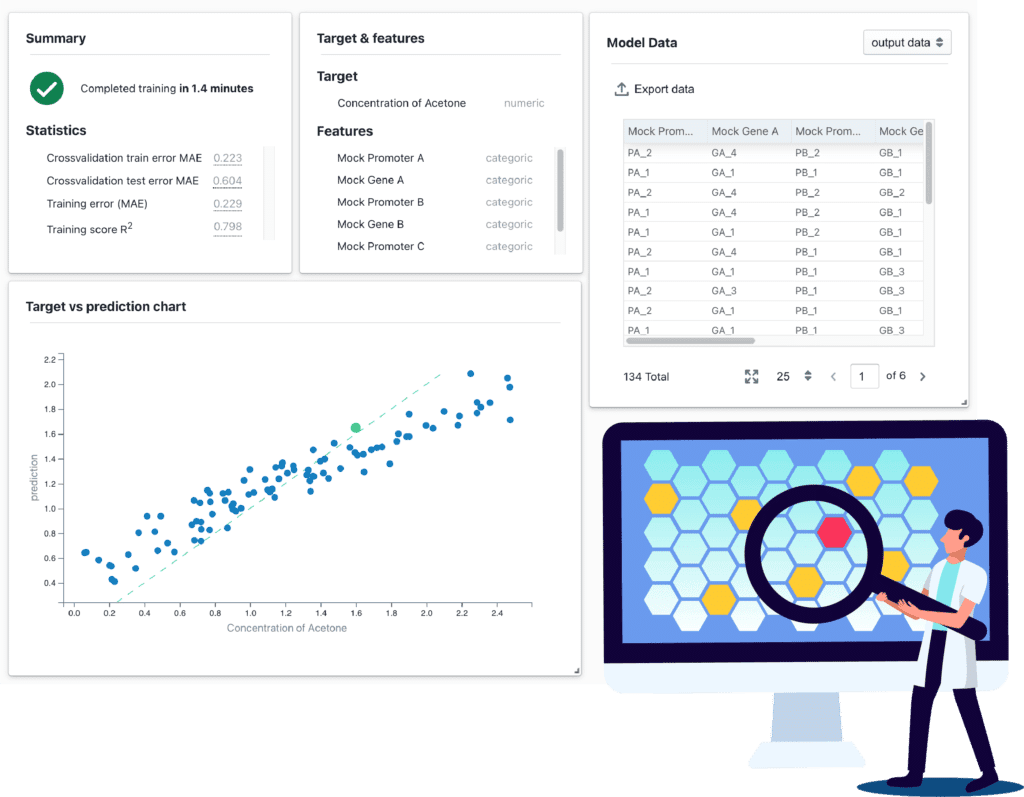
Each one starts from a guided wizard in the Discover section of the sidebar, and each finished run opens as a results dashboard with its summary, data tables and charts. Runs are saved in your workspace, so a teammate can open the same results.
Together they cover the learn step of the design, build, test, learn (DBTL) cycle: predictive runs answer how well a candidate might perform, generative runs answer what else to try, and evolutive runs answer which variants to build next.
| Run type | What you provide | What you get |
|---|---|---|
| Predictive | Assay data with descriptors and one numeric target | Predicted values for new candidates, with validation statistics |
| Generative | A large set of short amino acid sequences, with no measurements needed | New short sequences at low, medium and high diversity |
| Evolutive | Your measured data from earlier rounds | Recommended variants for the next batch, as a table you can export |
How does TeselaGen learn from your own assay data?
TeselaGen trains on a labelled dataset from your earlier rounds: one row per variant, the columns that describe each variant, and a numeric target such as activity or expression level.
You upload the dataset as a CSV or select the results of an assay already in your workspace. Descriptors can be categorical, numeric or amino acid sequences, and amino acid sequence descriptors must be 5 to 50 residues long. After training, the dashboard shows cross-validated and training statistics and a plot of measured against predicted values, so you can judge the model on your own data before you spend bench time.
Clean, consistent data matters more than volume: the same assay, the same units and unambiguous variant identifiers. Our checklist on exporting notebook data for machine learning covers how to structure results.
How much assay data do you need before machine learning helps?
Predictive and evolutive runs in TeselaGen start once you have a first round of consistent measurements. Before you have any, generative runs apply: they learn from a large training set of short amino acid sequences, 5 to 50 residues long.
The validation statistics of each predictive run show whether your data are enough.
How does TeselaGen recommend the next round of protein variants?
A TeselaGen evolutive run reads your measured data and returns a table of recommended candidate variants, which becomes the variant list for your next build.
The results dashboard shows how the recommended batch is spread across each descriptor, so you can see whether it covers the region you want to explore. The candidates export as CSV. To change the inputs, you start a new run with the updated dataset and compare the two dashboards.
How do you close the DBTL loop from a recommendation to a built construct?
In TeselaGen you export the recommended variants into sequence design in the same workspace, build and measure them, and feed the new measurements into the next Discover run.
Protein sequences go into your amino acid sequence library, where reverse translation turns them into DNA, and DNA assembly design turns the parts into constructs with an assembly protocol for the bench. Build the DNA orders for IDT (oligos and double-stranded DNA fragments) and Twist (DNA fragments and clonal genes) with the built-in ordering tools and submit them to the vendor.
Notebook entries record the build and the assay, and their results table, exported as CSV, trains the next round. Sequence design, DNA assembly design and preparing DNA orders are in TeselaGen Community.
Can an AI assistant help with protein engineering projects in TeselaGen?
Yes. TeselaGen CoScientist, the AI assistant inside the platform, helps with the design and data work around a project: sequences, designs and notebook content.
CoScientist works inside the same tools you use, so what it produces is an ordinary record in your workspace that you can open and edit.
The TeselaGen MCP server opens the same workspace to Claude, an IDE or any other Model Context Protocol (MCP) client: after you sign in with OAuth, the assistant can search and read your protein sequences, read notebook entries and look up UniProt entries and PDB structures.
What needs TeselaGen Enterprise for machine learning on protein engineering data?
Discover is part of TeselaGen Enterprise, so training or running a model needs Enterprise. Enterprise adds:
- Discover, for predictive, generative and evolutive runs on your sequences and experimental data
- Inventory and the material registry, to track the proteins and samples you build
- Workflow management and lab automation around the build step
- Freezer and equipment management
- Advanced molecular biology tools
Who is TeselaGen Discover for?
TeselaGen Discover is for protein engineering teams that run design, build, test, learn cycles and want each round of assay results to choose the next variants.
- Teams with measured variants from a first round who want predictive and evolutive runs on their own data
- Teams with a large set of short peptide sequences who want generative runs before they have measurements
- Teams that want models, results, designs and notebook records in one workspace their colleagues can open
- Teams that want recommended variants to feed DNA design and ordering in the same workspace
- Computational scientists who want to connect their own scripts through the REST API
How do I get started?
TeselaGen Community is free to start. The Enterprise features listed above come with TeselaGen Enterprise.
Start free with Community
Set up your notebook, sequences and DNA assembly design for free, and keep your assay results in a structured form. That groundwork is what a machine learning round needs.
Start free with CommunityReady to use machine learning on your assay data?
Ask about access, deployment and how your data formats map into Discover.
Ask about DiscoverFrequently asked questions
What is Synthetic Evolution?
Synthetic Evolution® is the machine learning engine inside TeselaGen Discover. You reach it through three run types in the Discover wizard (predictive, generative and evolutive), and each finished run is saved in your workspace as a dashboard whose results table exports as CSV.
What data can a Discover run train on?
Predictive and evolutive runs train on a CSV with an ID column, descriptor columns and one target column, or on the results of an assay in your workspace, so assay data does not need a round trip through a spreadsheet. Generative runs need only a column of amino acid sequences, from a CSV or from the sequences linked to a tag.
How many properties can one Discover run model?
One. Each predictive or evolutive run has a single target column, such as activity or expression level, and at least one descriptor column. To model a second property, start another run on the same dataset and compare the two dashboards.
What does a generative run return?
New amino acid sequences, each labelled low, medium or high diversity, which trades closeness to your training sequences against exploration. You export the ones at the level you want and upload them to your amino acid sequence library.
What does the dashboard show after a generative run?
A summary, the table of generated sequences and two charts that compare them with your training set, amino acid frequencies and sequence lengths, for each diversity level.
Can I start in Community and add Discover later?
Yes. Keep designs, sequences, notebook entries and assay tables in TeselaGen Community in a structured form, exportable as CSV and through the REST API, and ask us how to bring them into an Enterprise workspace when you start with Discover.