For synthetic biologists and molecular biology researchers
DNA cloning design software with primer design and cloning simulation
Updated October 2026
TeselaGen is DNA cloning design software that keeps primer design, cloning simulation, Gibson and Golden Gate design and oligo ordering on the same sequences. TeselaGen CoScientist, the AI assistant inside the platform, designs PCR primer pairs and sets up Gibson or Golden Gate designs when you ask. All of it is in TeselaGen Community, the free edition for individual researchers, academic labs and small teams.

What does TeselaGen Community include for cloning?
TeselaGen Community includes the sequence editor, primer design, digest and PCR simulation, Gibson and Golden Gate design with assembly protocols, IDT and Twist ordering and TeselaGen CoScientist, at no cost.
- Sequence editor with plasmid maps, annotation, primers and alignments
- Primer design with pairs ranked by penalty score, with Tm, GC% and product size
- Restriction site search, virtual digest and PCR simulation
- Gibson design, and Golden Gate design with your own Type IIS enzyme and junction overhangs, each with an assembly protocol
- DNA Assembly from Digest for parts cut by one Type IIS enzyme
- Built-in IDT and Twist ordering tools
- TeselaGen CoScientist, the AI assistant inside the platform
- Electronic lab notebook that links entries to your sequences and designs
What free software designs PCR primers and creates oligo order forms?
TeselaGen Community designs PCR primers against your own DNA sequences and turns the ones you pick into IDT oligo orders, free of charge. You select a target region, and TeselaGen returns primer pairs ranked by penalty score, with Tm, GC%, product size and product Tm for each pair.
Primers are records in your workspace. A primer lives on its sequence, shows on the editor's primer track, carries any 5' cloning tail you add, and is reused by later designs and notebook entries. You build the order for the ones you pick with the IDT ordering tool.
You choose where each primer binds relative to your region and set the Tm, length and GC ranges the pairs must meet.
- Primer pairs ranked by penalty score
- Tm, GC%, product size and product Tm for every pair
- An optional part for each pair's amplicon
Is there an AI assistant that can design primers and clone DNA constructs for me?
Yes. TeselaGen CoScientist, the AI assistant inside TeselaGen, designs a PCR primer pair for a sequence and target region you give it, builds a Gibson or Golden Gate design from parts in your workspace and submits it for assembly.
CoScientist works on the sequences, parts and designs already in your workspace. Ask it to design primers for a region, to explain which cloning route fits your insert and vector, or to point you to the tool for the next step. It returns the primer pair with each primer's Tm and the expected product size, and the design it creates is a regular design in your workspace, with its assembly protocol once assembly runs.
Primers you add to the sequence show on the editor's primer track and feed the PCR simulation, so an AI-designed pair goes through the same simulation and ordering steps as any other.
From Claude or an IDE, once you sign in to the TeselaGen MCP server, the assistant can search and read your sequences, create one from pasted GenBank or FASTA text, design a primer pair for a region and translate or reverse-complement a sequence.
How can I simulate cloning an insert into a plasmid vector for free?
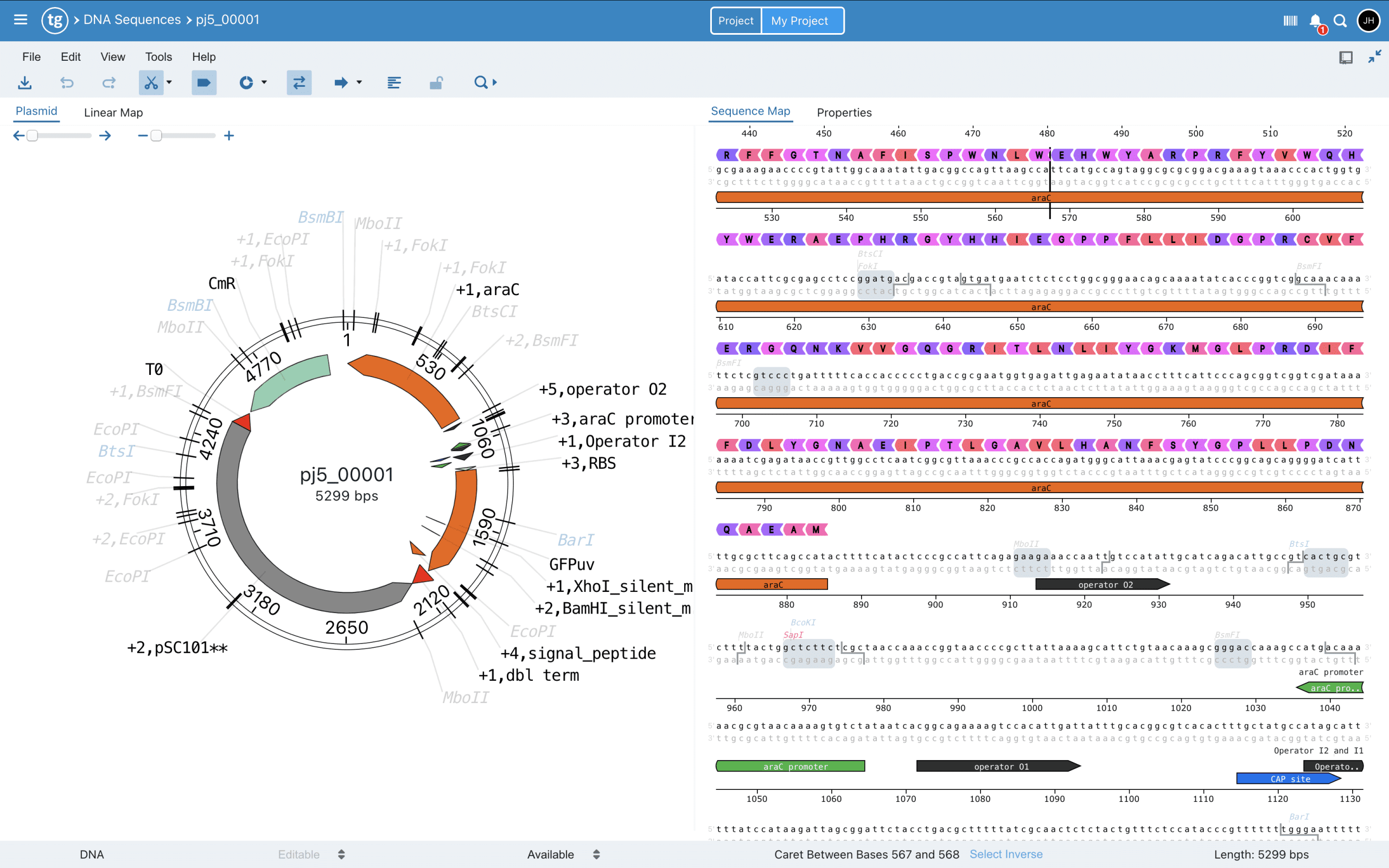
TeselaGen Community simulates cloning in the sequence editor: you find single-cutter sites in the vector, run a virtual digest, add enzyme sites to your insert as primer tails and simulate the PCR to see the product. To build the construct, you set up a Gibson or Golden Gate design and TeselaGen returns an assembly protocol.
For a single insert, open the backbone, filter the cut sites to single cutters and run a virtual digest to see the predicted fragments. Add the enzyme sites to the insert as 5' tails on your primers, simulate the PCR to see the product with the added sites, and check that the overhangs on insert and backbone match.
For several fragments or scarless joins, submit a Gibson or Golden Gate design and TeselaGen designs the primers and junctions for you.
DNA Assembly from Digest takes parts already cut by one Type IIS enzyme, orders them by their matching overhangs and creates the Golden Gate design for you to submit.
| Job | Route in TeselaGen |
|---|---|
| One insert into one site of a backbone | Virtual digest, primer tails and PCR simulation in the sequence editor |
| Several fragments, scarless joins, Type IIS builds | Gibson or Golden Gate design with an assembly protocol |
| Digest parts cut by one Type IIS enzyme | DNA Assembly from Digest, which creates the Golden Gate design |
| Prepare primer and fragment orders | IDT and Twist ordering tools |
How do you go from a primer design to an oligo order?
In TeselaGen you select the primers or fragments from your sequence library and build the order with the built-in ordering tools: IDT (oligos and double-stranded DNA fragments) and Twist (DNA fragments and clonal genes). Each tool checks your sequences against the vendor's synthesis rules and builds the order table for you to submit.
Because the oligos are linked to the sequences they came from, the order carries names and sequences you already checked, and you can see later which sequences and oligos were ordered.
How does TeselaGen catch primer errors before you order?
TeselaGen catches primer errors on the sequence you designed them on: the PCR simulation shows the product your pair makes, including the bases your 5' tails add, and the editor's cut-site display shows any enzyme site already inside the insert or vector.
Because the primers, the simulation and the digest sit on one sequence record, the checks need no exports or copy-paste. Download the simulated product and open it in the editor to see the enzyme sites your tails create. TeselaGen does not check primer specificity against a genome.
What needs Enterprise?
Enterprise adds the advanced molecular biology toolkit and the lab operations around your designs: inventory, workflow management, lab automation, freezer and equipment management, and Discover.
- Advanced molecular biology toolkit: multi-level (hierarchical) designs and more assembly methods, including PCR assembly and USER assembly
- Inventory and the material registry, including plates and tubes
- Workflow management
- Lab automation for liquid handlers
- Freezer and equipment management
- Discover, the machine learning toolkit for protein engineering
Who is TeselaGen primer design and cloning simulation for?
TeselaGen is for molecular biologists and synthetic biology teams who design primers and constructs they will reuse, and want the design, the order and the notebook entry connected.
- Researchers who clone inserts into plasmid vectors and check digests and PCR products before ordering
- Teams that reuse primers and constructs across projects
- Groups that want every oligo order traced back to the sequence and design it came from
- Researchers who want an AI assistant working on their own sequences
- Academic labs and small teams that start free and keep their sequences, designs and notes together
What should I read next?
How do I get started?
TeselaGen Community is free to start. The Enterprise features listed above come with TeselaGen Enterprise.
Start free with Community
Design primers, simulate cloning and prepare oligo orders with your sequences, designs and notebook in one place, at no cost.
Start free with CommunityRunning the whole lab on TeselaGen?
See how Enterprise connects your designs to the bench.
See Enterprise plansFrequently asked questions
How does TeselaGen rank primer candidates?
By penalty score, which measures how far each primer is from the optimal values in your settings. The lowest penalty is the best match. Each pair also shows Tm, GC%, product size and product Tm, so you pick the pair that fits your reaction.
Where can the primers bind relative to my target region?
You set it for each end: anywhere in and around the region, inside it, flanking it by up to 100 bp, overlapping its ends or near the selected end.
Can I reuse oligos I already have as primers?
Yes. Set the 5' or 3' binding region to Use Existing Oligos and select oligos from your library, and TeselaGen uses them as the primers for that end.
What happens when no primer pair fits my settings?
The dialog shows suggested fixes, such as raising or lowering a Tm limit, that you apply with a click. Turn on Auto-adjust parameters and TeselaGen applies them and retries for you, then lists each setting it changed.
Which primer settings can I change?
Under Advanced Options you set the product size range, the primer Tm, length and GC ranges, the hairpin Th limit, a 3' GC clamp and the longest allowed mononucleotide repeat. The default primer Tm range is 56 to 62 °C.
Are the primers I create saved to my library?
Yes. Each primer is saved as an oligo in your sequence library and added to the template's primer track, with its penalty score in the primer notes. Primers TeselaGen designs for an assembly join the library through the assembly protocol's Save to Oligo Library action.